Blog
Lighting and shadows: The simulator killer nobody budgets for
Overhead lights, windows, and shiny floors break camera readings and wash out projector images. All three are fixable.
By the My Golf Obsession teamPublished Oct 29, 2026
BenQ
The takeaway is blunt: before you blame your launch monitor for bad numbers, check your lights. Camera monitors read the ball with light, and projectors need darkness to show a sharp image. Those two needs fight each other in the same room, and most simulator rooms are built without a plan for either one.
That conflict is why lighting shows up in so many troubleshooting threads. A monitor that reads fine at night starts missing shots on a sunny afternoon. A projector that looked crisp in the evening looks grey and flat at noon. Neither device broke. The room changed.
Why camera monitors care about light
A camera monitor photographs the ball at impact, many times per second, and works out speed, launch, and spin from those images. It needs a clear, consistent view of the ball. Flickering light, a bright spot on one side of the hitting area, or a sudden shaft of sunlight all make that view harder to trust.
The fixes are cheap, and they are about consistency more than brightness:
- Use even, flicker-free LED light over the hitting area, not a single harsh bulb overhead.
- Keep light off the monitor's cameras. No bulb should shine straight into the unit's lenses.
- Kill the flicker. Old fluorescent tubes are a classic culprit, and they are worth replacing even if they still work.
- Keep the light steady during a session. A room that is bright on one side and dark on the other gives the cameras a different picture on every swing.
Some camera monitors help themselves. Uneekor's Eye Mini Lite, for example, uses built-in infrared lighting and works in dim rooms, according to its placement guide. Foresight's GC3 works from bright sun to total darkness, according to Foresight, but its guides still stress consistent, shadow-free light for best accuracy. The point is not that every camera monitor needs a bright room. The point is that every camera monitor needs a stable one.
Our ball data vs club data guide explains which numbers each type of monitor measures, and why a missed read costs you more on some of those numbers than others. A dropped spin reading on a wedge matters. A dropped carry number on a driver matters more.
Why radar monitors care less, but still care
Radar monitors track the ball with radio waves, not pictures, so room light barely touches their core measurement. That is one reason radar units are popular in garages and rooms with windows you cannot fully cover.
Light still matters, just for different reasons:
- You still need to see the ball, the mat, and your stance clearly to swing well.
- Swing video and camera add-ons still need light. Uneekor's Swing Optix cameras, for example, call for a minimum of eight 15 watt or higher non-flickering LED bulbs on a track rail, angled away from the projector's light path.
- Fluorescent and flickering light can still interfere with some radar units, so the flicker rule holds even here.
So radar buys you forgiveness on the measurement, not a free pass on the room. If you plan to add swing cameras later, budget the light for them now, while the ceiling is still easy to reach.
Projector washout: a dark room beats a bright projector
A projector cannot produce black the way a TV can. It throws light at a screen, and any ambient light hitting that screen turns black into grey. BenQ puts it plainly in its golf simulator lighting guide: a brighter projector helps, but even the most expensive cinema projector needs a dark theater to look right.
That leads to a simple rule: control the light first, then buy lumens. BenQ recommends a minimum of 3,000 lumens with a short-throw lens for screens around 8 to 9 feet tall, and 4,000 to 6,000 lumens for larger screens or rooms with more ambient light. Independent projector guides land in the same place, at least 3,000 lumens, and 4,000 or more if the room has ambient light.
Practical steps that cost little:
- Cover windows with blackout curtains, or seal the garage door gaps that leak daylight.
- Keep spotlights off the screen and out of the projector's beam path. BenQ specifically warns against spotlights shining on the screen or in the general area of the projector's illumination path.
- Use side curtains or enclosure walls on both sides of the screen to block stray light.
- Light the hitting area with focused beams, such as PAR 38 LED bulbs or track lights aimed at the mat, not at the screen. That puts light where you swing and keeps it off where you watch.
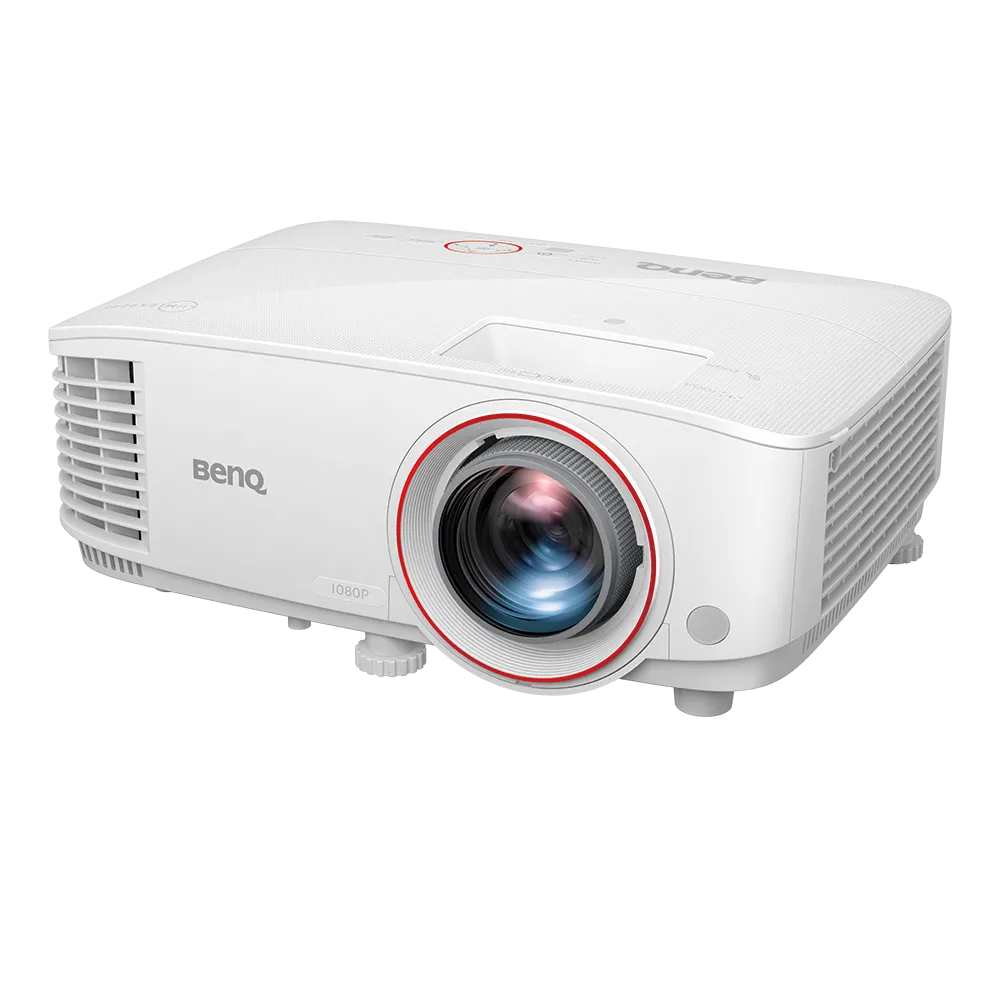
The BenQ TH671ST deal page is a useful example of the floor, not the ceiling. It is a short-throw 1080p projector at 3,000 ANSI lumens with a 0.69 to 0.83 throw ratio, which is plenty in a dark room and thin in a bright one. Check the deal page for the live price before you buy, and spend the savings on blackout curtains if your room has windows.
Shadows on screen: the ceiling mount answer
Shadows come from one place: something between the projector and the screen. Usually that something is you, or your club on the follow through.
The fix is geometry, not brightness:
- Use a short-throw projector, with a throw ratio around 0.5 to 0.8, so it sits close to the screen and fills a wide image from a short distance.
- Ceiling mount it in front of your swing path, not behind you. A long-throw projector mounted behind the golfer puts your body and club right in the beam.
- Check the throw math before you buy. Throw distance equals throw ratio times image width, measured on image width, not screen diagonal. Get that wrong and the projector lands in your swing, no matter how bright it is.
- Keep the mount clear of the swing. A projector that survives your driver follow through is in the wrong place, even if the picture looks fine today.
A floor-standing projector behind the hitting area is the most common shadow mistake in first builds. It feels temporary and sensible, and it guarantees a silhouette on every backswing.
The five-minute room check before you buy
Do this before you order a monitor or a projector, not after the boxes arrive:
- Stand on the mat at noon and at night. Note every window, skylight, and overhead light that hits the hitting area or the screen wall.
- Hit a few practice swings and watch where your shadow falls. That is where the projector must not be.
- Turn on every light you plan to use, then look at the screen wall. If it is already grey before the projector turns on, fix the light first.
- Check for flicker. Phone cameras make fluorescent flicker easy to spot, and your monitor's cameras will spot it too.
- Check the floor. A shiny concrete or tile floor bounces light up into cameras and onto the screen. A mat and a rug fix more than they cost.
Our take
Budget light like hardware, because it behaves like hardware. A dimmable, flicker-free LED setup over the hitting area, blackout coverings on the windows, and a ceiling-mounted short-throw projector will do more for your numbers and your picture than the next monitor upgrade. Most "bad monitor" stories we hear are really "bad room" stories, and rooms are cheaper to fix than monitors are to replace.
Sources: BenQ golf simulator lighting guide, The Sim Room golf simulator lighting guide.
Shop the post